
Use COROS training with ChatGPT or Claude for AI coaching
Already use COROS? Athmex gives ChatGPT or Claude the goals, PBs, races and real-life constraints behind your training, so its plans, workouts and race advice fit you. Create your free Athmex account to see your COROS connection options.
You. Your fitness. Your activity data. Together in Claude and ChatGPT.
Can you connect COROS to ChatGPT or Claude?
ChatGPT or Claude can turn your COROS runs, training load and recovery into more personalised coaching when it also knows your goals, fitness, PBs and races, which Athmex keeps ready in every conversation. Create your free Athmex account and we'll show you the available options for using your COROS training in ChatGPT or Claude alongside your profile.
COROS shows what happened. Athmex explains what you're training for.
Your training platform shows what you've done. Athmex gives ChatGPT or Claude the goals, fitness, races and real-life constraints behind it, helping your AI coach create better training plans, workouts and race advice.
COROS records
- Runs, rides and workouts
- EvoLab: Running Fitness, Base Fitness and Load Impact
- Training Load, Recovery and Intensity Trend
- Threshold pace and zones
- Race Predictor and VO2 max
- Your COROS plan and calendar
Athmex adds
- Your priority race and why it matters
- Goal times
- PBs and thresholds you've confirmed, with dates
- Weekly availability
- Injuries and constraints
- Equipment and terrain access
You. Your fitness. Your activity data. Together in Claude and ChatGPT.
From COROS PACE to EvoLab
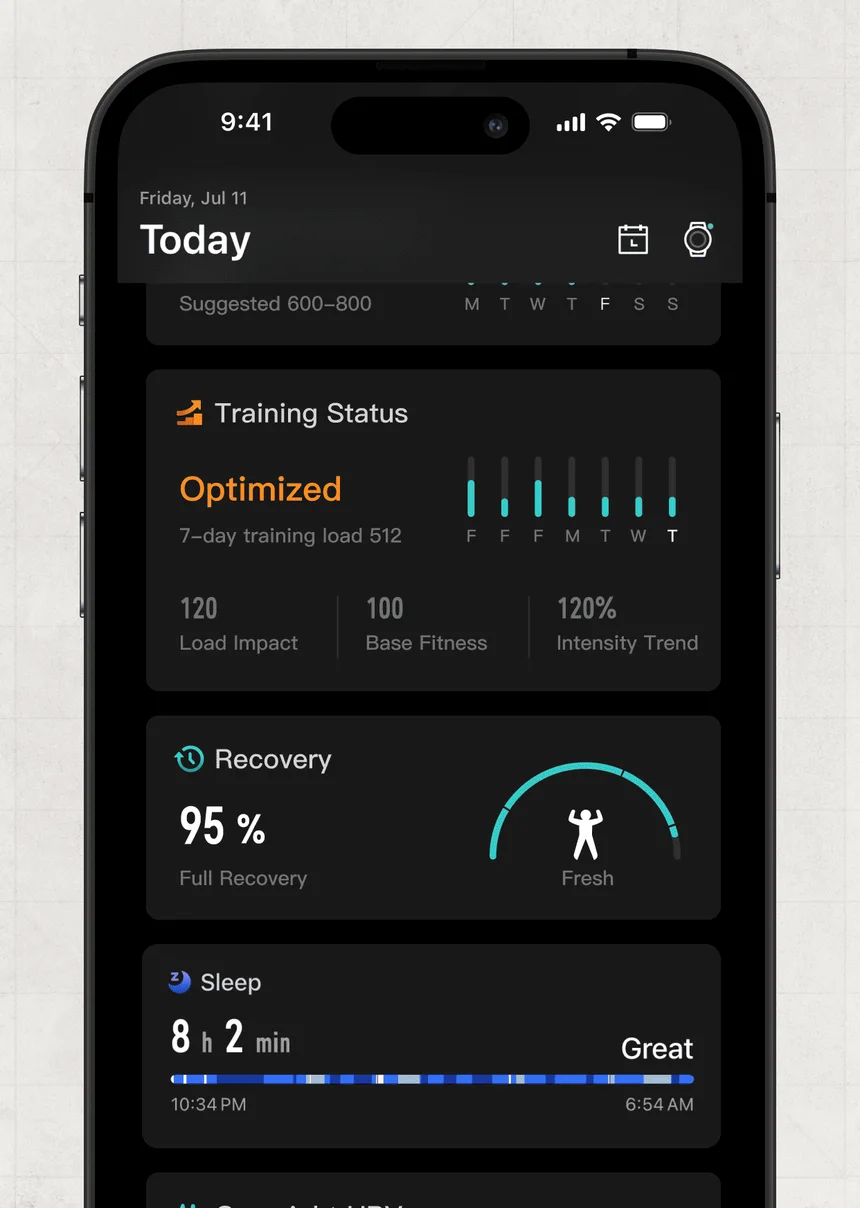
COROS athletes record on a PACE, APEX, VERTIX or DURA and review in the COROS app and Training Hub. EvoLab is where the analysis lives: Running Fitness, Base Fitness, Training Load, Load Impact, Intensity Trend and Recovery, with the Race Predictor and VO2 max estimates alongside.
Those measures describe fitness and fatigue in useful detail. Base Fitness tracks your long-term foundation; Load Impact shows the short-term hit; Intensity Trend says whether the mix is drifting harder or easier. Training Focus and Effort Pace shape individual sessions.
None of them knows why you're training. A rising Load Impact is fine three weeks from a marathon and a problem three days out. That's the question an assistant can answer when your race and priorities sit in Athmex.
Using COROS running data with AI
Threshold pace, threshold heart rate, pace zones and heart-rate zones set the intensity for most COROS runners. With those in place, an assistant can review a tempo run, a long run or a race-pace session and tell you whether it did its job.
The difference is in whose threshold it uses. COROS estimates one from your data. You may have a different number from a recent race or test that you trust more. Keep it in Athmex with the date it applied, and tell the assistant which to plan from.
Trail, mountain and ultra training
APEX and VERTIX athletes often race on terrain where distance says little about effort. Vert, descent and time on feet matter more. An assistant planning a mountain build needs your race, its profile, the terrain you can actually reach and how long your longest days can be.
Put those in your Athmex race notes and constraints. COROS then supplies what you did, and the assistant can check it against what the race will ask of you.
COROS DURA and cycling data
The DURA bike computer brings cycling into the same COROS account: power, cadence, heart rate and routes. For triathletes and riders who also run, that puts most of the week's training in one place.
Cycling power needs its own reference point. Keep your FTP and the event you're riding for in Athmex, so power is read against the right numbers.
Race prediction versus the race goal
The COROS Race Predictor estimates what you could run today. Your goal is what you want to run on the day. The gap between them is the useful conversation: is the goal realistic, and what has to change to close it?
An assistant can only have that conversation if it knows the goal, the race date and your recent race history. Athmex keeps those ready so the prediction is read against something real.
Recovery, sleep and HRV on COROS
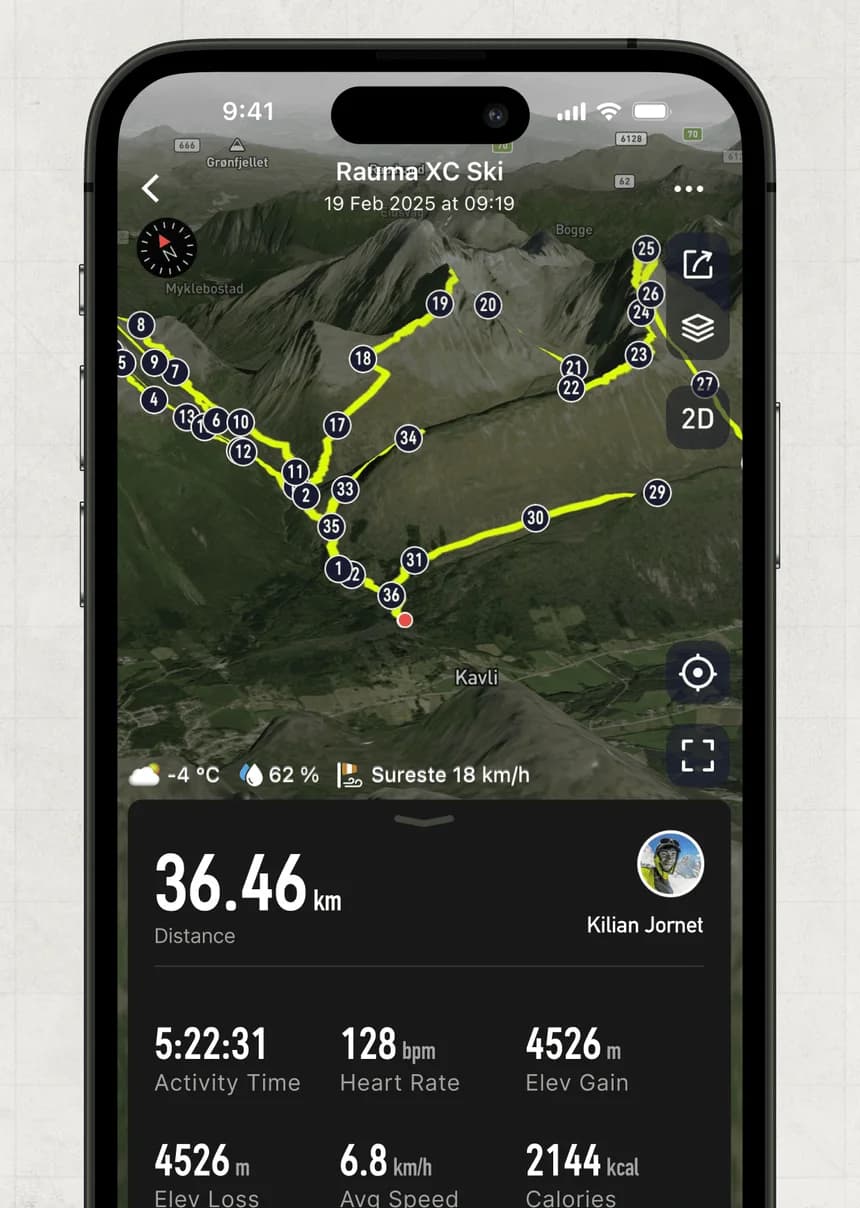
COROS tracks overnight HRV, sleep and a Recovery percentage that climbs back after each session. Together they say how ready you are for the next hard day.
They say less about whether the hard day should happen. A Recovery of 60% before an easy run is irrelevant; before a long run with race-pace blocks it's worth a conversation. The assistant needs the plan and the race to judge it, and your Athmex profile supplies both.
COROS for triathletes
Many triathletes record everything on one COROS watch: pool and open-water swims, rides with a power meter and runs off the bike. Training Load combines them, which is useful for fatigue and hides which sport is doing the work.
Keep your race format, your thresholds in each sport and your weakest discipline in Athmex. ChatGPT or Claude can then look at the week by sport and say whether the balance fits the race.
From a COROS number to a coaching decision
A few examples of how athlete context changes the answer:
Running Fitness drops after a holiday
Expected, and usually quick to come back. The assistant can plan the return around your race date rather than chasing the number.
Intensity Trend keeps rising
If your plan is a marathon build, too much intensity is a common mistake. The assistant can check it against the kind of race you've entered.
Race Predictor beats your goal
Tempting to raise the target. The assistant can weigh it against your real race history and how many weeks are left.
What ChatGPT or Claude can do with COROS training
- Build a plan that lands on your watch
- Ask for a block around your real race and running days, and review it before it goes into COROS.
- Sense-check Running Fitness
- Talk through whether Running Fitness and the Race Predictor support the goal time you have in mind.
- Manage load around life
- Use Training Load and Recovery alongside your availability to decide what this week should be.
- Poor recovery before a key session
- Recovery is low on long-run day. Decide what to do knowing your race date and the purpose of the run.
Questions COROS athletes ask about ChatGPT and Claude
Can ChatGPT use COROS EvoLab data?
Yes, when the figures are in the conversation. Athmex adds the goals and constraints that give EvoLab measures such as Running Fitness and Training Load their meaning.
Can Claude use COROS Running Fitness?
Yes, when the figure is in the conversation. It's most useful read against your target race and the PBs you trust, which Athmex keeps ready.
Can ChatGPT or Claude create workouts in COROS?
ChatGPT or Claude can help plan workouts using the goals, thresholds and availability in your Athmex profile. Whether those workouts can be sent to COROS depends on the options available for your setup. Athmex itself doesn't send workouts to your watch.
Should the assistant use my COROS threshold pace or my own?
Tell it which to trust. Keep the threshold you've confirmed in Athmex, with its date, so the assistant knows which number to plan from.
Do I need Athmex if COROS already connects?
Athmex serves a different purpose. It keeps your goals, races, thresholds, availability and constraints ready for ChatGPT or Claude, helping your AI coach give advice that reflects your wider training.
Give ChatGPT or Claude your COROS training, and the athlete it belongs to.
- 1
Create your free account
It takes a couple of minutes.
- 2
Build your athlete profile
Add your goals, races, PBs, thresholds, availability and constraints.
- 3
Connect Athmex to ChatGPT or Claude
One connection, and your assistant has your profile in every conversation.
- 4
See your COROS connection options
Your Athmex account shows the available connection options for COROS with ChatGPT or Claude.
You. Your fitness. Your activity data. Together in Claude and ChatGPT.